Creative-Audio-Production.com

…To explore strange new sonic worlds, …to boldly put a microphone where no microphone has gone before.

  • Challenge: Learn Ableton Live in A Week!
  • Links

DNA Glitch Effect (Zedd, etc)

Posted by petebuchwald on January 4, 2016
Posted in: Uncategorized. Leave a comment


I was listening to Zedd’s “Straight into the Fire” and at the 3:07 mark I heard him do something that stopped me in my tracks.

Screen Shot 2016-01-04 at 11.11.19 AM.png

“What was that!!??”  …. i was mesmerized, perplexed, intrigued.     And I had to make that sound my own.    I had to learn how to do it!

After thinking about it for a while, I had an idea of how to do it.   Then, the other day I was producing a song and thought I saw an opportunity to give it a try.    I was very happy with the results and thought I would share.

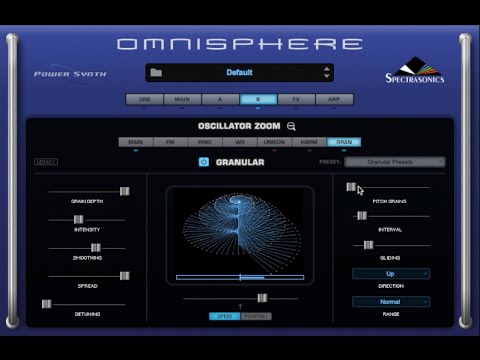
You’ll need a granular synth that allows you to import your own audio, I used Omnisphere, but here’s a thread discussions that lists other options.

http://www.kvraudio.com/forum/viewtopic.php?t=392232

hqdefault.jpg

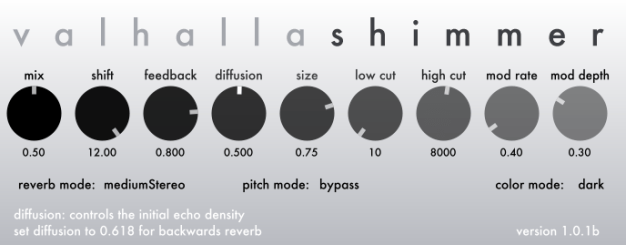
Or Valhalla Shimmer.

bloom1.png

Valhalla Shimmer

Here’s my video, showing how to do it.


If You Create Music. You Can Make Money!

Posted by petebuchwald on July 7, 2015
Posted in: ableton, business, commerce, commercial, content, FL Studio, Garage Band, Logic Pro X, music, Pro Tools. Tagged: Ableton, beats, collection, commercial, licensing, list, live, Logic X, movie, music, music libraries, original, producer, selling song, selling tracks, sync, Television, track, TV, video games. 1 Comment

Screen Shot 2015-06-12 at 7.51.26 AM

As a music producer one of the wisest thing you can do, is to look for opportunities for passive income.  You need income sources that bring you money as you sit in your studio, go shopping, take a break to a play video game, etc.   There are many types of passive income.    Some people have rental properties (high cost, but can be high yield).   My roommate at Berklee was an art dealer from Mexico, when he needed more pocket money he would go to the art galleries of Boston and he knew which pieces he could sell quickly for profit.    Personally, I have an inventory of used books that I market worldwide for profit via Amazon.

People who create music in Ableton Live, Logic Pro X, FL Studio, etc.  should take some time each week and post content for commercial licensing.

With digital sales giving artists/writers so little payment, finding opportunities to place a song in TV/Film/Commercials is the last frontier in terms of strong income sources.

I’d like to share some resources that get your music out there for commercial use.   If you’re a band or performing artist, the music you market for commercial use doesn’t necessarily need to be the music that you play on stage, and sell on iTunes.   But it can be.

For me, until I learn that these websites are trust-worthy I tend to create custom music.   That way, if there is something in the fine print of the contract that I didn’t catch, a music library won’t be robbing me of one of my precious gems.

The libraries that I’ve submitted to are all non-exclusive.  Meaning that a person can post the same song in multiple online libraries.

There was no cost to submit songs to the libraries.   But if your track gets chosen by a client, the website can take a significant cut of the profits.   But remember that it’s better to have a small piece of a very big pie than to have a big piece of a very small pie.

Screen Shot 2015-07-07 at 11.48.09 AM

I hope that it goes without saying that you should certainly read the contractual agreements to any submission opportunity.

Befriend the Gatekeeper

Finally, before I give the dot-coms to you, I want to point out that you should develop any relationships with music supervisors for TV/Film.    If you can place songs directly with anybody, that is the better way to go.   You retain more of the money, you’re building a win-win relationship with an industry friend.   Don’t be afraid to seek ways to bypass the online libraries (mentioned below) if you have ways to pitch or place your songs directly.     Here in Denver (also in California) we have the Durango Songwriter’s Expo, where music supervisors from network TV listen to original music and hang out with writers.  A (talented!) friend of mine who attended the Expo got to hear her song in TV/Film, including a placement on Grey’s Anatomy.

Another friend of mine spends time in his studio producing commercial songs on spec (speculation) for local business who advertise on the radio/TV.  He will send them a short sample of the audio he created, along with his contact information.   It’s a bit of a risk, he works hard on the music/narration and might not be paid.   But he’s seen enough success with this method to keep him doing it!      In the time he could have watched a movie or a few episodes of TV on Netflix, he created something that might generate him some income, and build some local professional relationships.

With all that said, here are the music libraries I’ve found and looked in to.   Feel free to add others, and to comment about your experiences in the blog comments below.

THE TWO LIBRARIES THAT I HAVE SUBMITTED TO

Screen Shot 2015-07-07 at 8.35.28 AM

1.   PumpAudio.com   Pump sends out a hard drive of audio content to their clients every six months or so.     They set the bar very high in terms of quality, and they are pretty specific with the types songs they are seeking.     I’ve only made it past the first one or two gate-keepers so far.   The website is very specific as to the current demands of their clientele, so you can look over the kind of content they are seeking and try to produce music accordingly!

Screen Shot 2015-07-07 at 8.37.07 AM

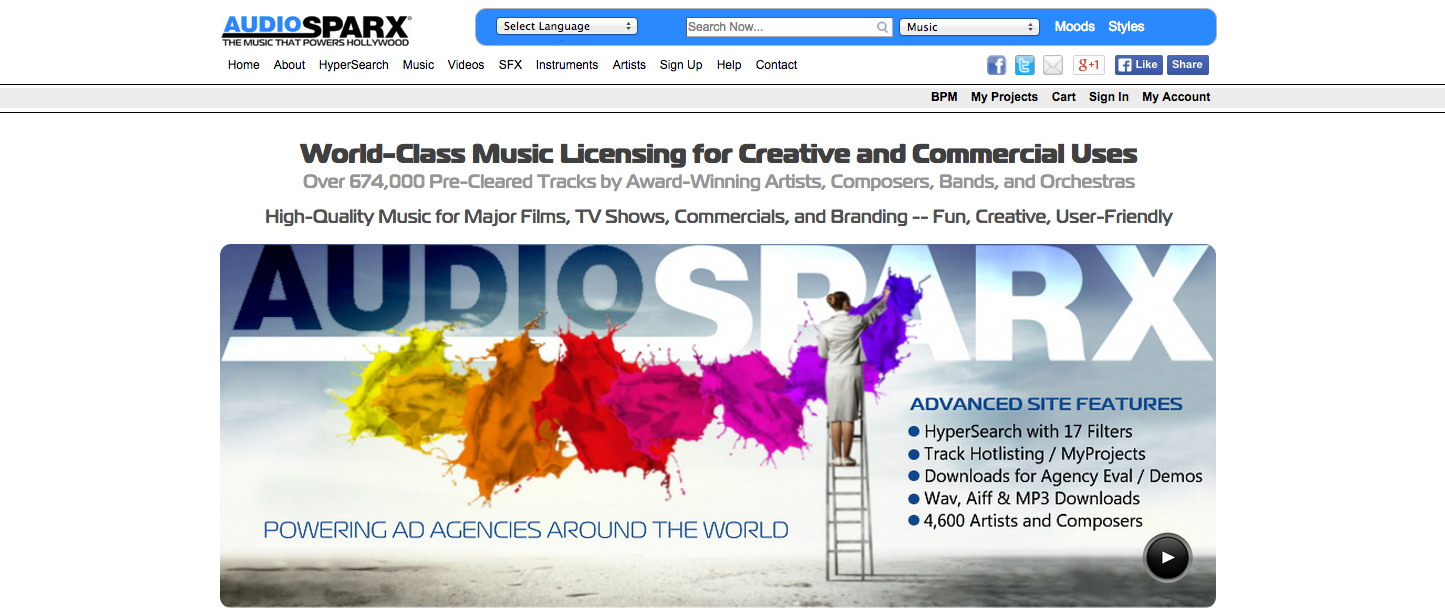
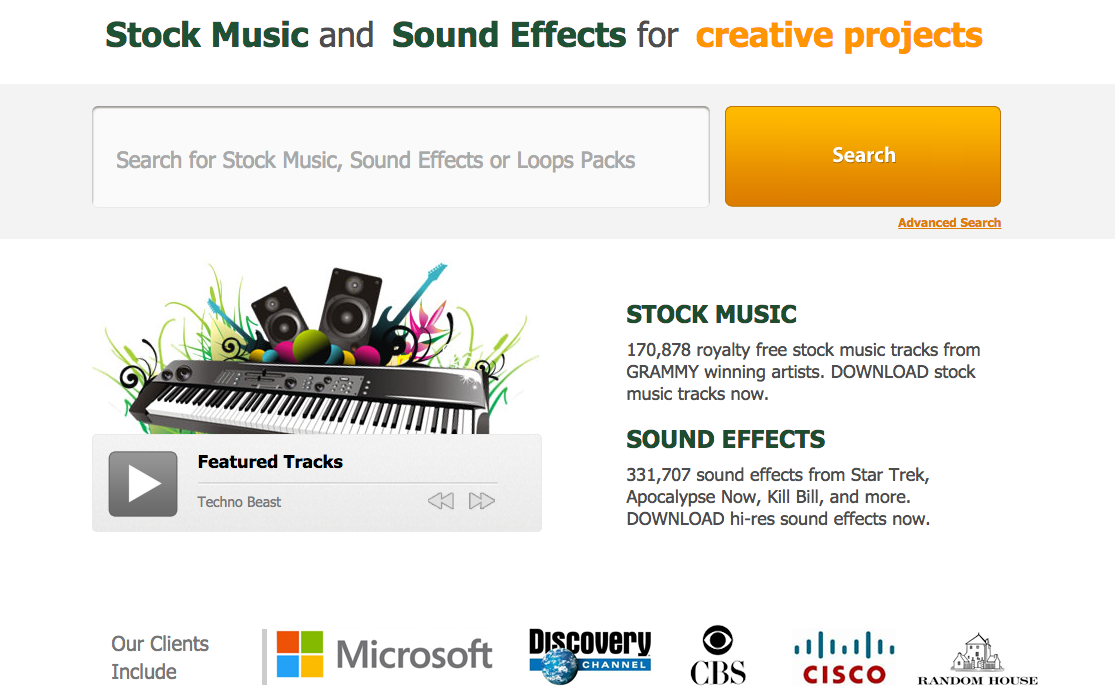
2.  AudioSparx.com     This site is easier to get music posted, they take anything.    But the pay-out is lower, and the site has an endless supply of contributors and tracks.    I’d recommend researching what is in demand, and what is lacking in their catalog before submitting.

HONORABLE MENTION

Screen Shot 2015-07-07 at 9.52.18 AM

3.  YouTube.com    Not really a music library, but I wanted to mention it as a passive income source.   I’ve received much more income from creating videos (monetized) than I have in creating commercial music for online libraries.    People look to YouTube for so much in life: music, humor, education, how to fix their dishwasher, etc.   Any content you create will probably have a demographic of interested viewers.    One of my most popular videos is how to repair a Mackie loudspeaker.

The last resources I wanted to share I’ve learned about from Steve Cherubino on The Producer’s Podcast.

Screen Shot 2015-07-07 at 10.47.22 AM

He interviews electronic music producers from around the world, asks them about their process for making music, their favorite plugins, and where they post their music for sale.      (Subscribe on iTunes)

Steve pointed out that when he creates music that doesn’t fit into his artist set, he’ll post in online libraries.  And he’s received some decent income in return!

STEVE’S FAVORITES

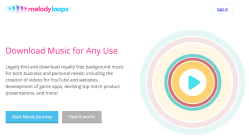
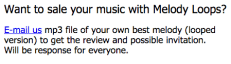
   MelodyLoops.com appears to offer musical content that will loop, perhaps stating the obvious.    So if a person has a need for musical content that is flexible in duration, MelodyLoops offers content for that.    They will ask for a single submission of your best work as an audition.   They will reply with a response about your music.
Screen Shot 2015-07-07 at 9.54.42 AM
Screen Shot 2015-07-07 at 9.56.10 AM
Screen Shot 2015-07-07 at 10.06.05 AM
AudioJungle.net
Screen Shot 2015-07-07 at 10.38.33 AM
    Part of the Envato collection of content (sound effects, photos, video content, etc).   As a contributor to their world of content, they refer to you as an “author.”
Screen Shot 2015-07-07 at 10.41.27 AM
Others libraries that Steve mentioned.
AudioMicro.com
Screen Shot 2015-07-07 at 10.51.21 AM
RevoStock.com
Screen Shot 2015-07-07 at 10.52.21 AM
Pond5.com
Screen Shot 2015-07-07 at 10.54.15 AM
       I encourage you to give a few of these libraries a try.   Maybe as you sip your morning coffee and eat your cereal you can crank out a musical track and post it in a library or two.
Screen Shot 2015-07-07 at 11.01.40 AM
        These websites often use the phrase “Sell Your Music” in a way to attract composers and producers.   In most cases what they mean is that you (the writer will) retain the intellectual property of the song, and you are merely selling licenses for commercial use.   So if you see that phrase, don’t be too alarmed, but make sure to read the fine print.
        In some cases there might be opportunities to Work For Hire, which often involves a higher payment to the composer, but also involves the surrendering of the intellectual property.     This arrangement can work well, especially if the expectations are clearly communicated up front.
       Wow, what a coincidence …. just as I was finishing up this list a songwriter friend posted on social media that she had a song accepted into the Crucial Media library !     And so we learn of yet another non-exclusive library.    Congrats DC !!
       CrucialInterractive.com  
Screen Shot 2015-07-07 at 11.08.54 AM

Did you know? Shuffle-Grid Mode …. It’s a thing.

Posted by petebuchwald on July 6, 2015
Posted in: Uncategorized. Leave a comment

Screen Shot 2015-07-06 at 2.00.35 PM

Attention Pro Tools users.

Have you ever wanted to have both Shuffle Mode and Grid Mode active at the same time?    Well you can!

All you have to do is select one of the two, (it doesn’t matter which one you choose first).  Then you will need to use a modifier in order to get the second mode active at the same time.  So hold SHIFT and mouse click on the second one.

Happy grid shuffling!!

Here’s a short screen movie of the mode in action.

Slate Remote (with Batch Commander)

Posted by petebuchwald on June 7, 2015
Posted in: Uncategorized. Tagged: batch commander, engineer, iOS, ipad, iphone, Logic Pro, Logic X, mixing, plugin, Pro Tools, producer, quick, remote, steven slate, tips, trick. Leave a comment

Pro Tools (mac) and Logic Users.  Looking for time savers?

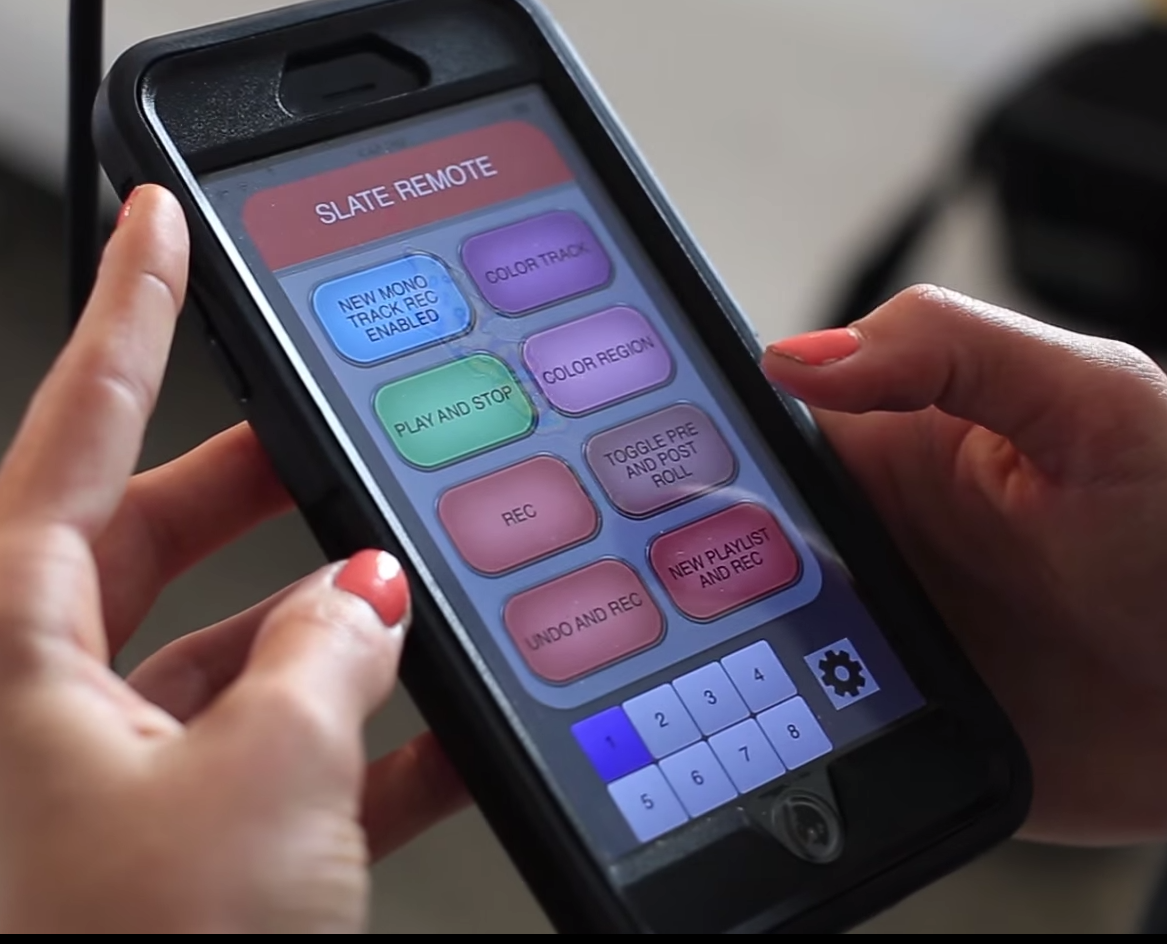
Imagine selecting a single button on your iPhone or iPad (you can have multiple iOS devices connected at the same time!) and the computer automatically executes a series of mouse clicks and keyboard shortcuts.   Amazing!

Add plugins for ALL of your backing vocal tracks, or ALL your favorite drum plugins and settings with a single click.

Screen Shot 2015-06-07 at 8.21.04 AM

From what I’ve seen Remote (iOS 7+) can help two types of people.

1. If you record yourself frequently and want to avoid taking off the headphones, walking back to the computer to perform tasks on the computer with mouse/keyboard. (See video 1)

2. If you are a mixing engineer and have established standard sequences of plugins, and signal flow that you use as a starting point for many mixes. (See video 2)

Video One

Screen Shot 2015-06-07 at 8.41.04 AM

Video Two

Screen Shot 2015-06-07 at 8.43.37 AM

Free iTunes Download

https://itunes.apple.com/app/slate-remote/id956639986?mt=8

Logic Pro X Courses (Free!)

Posted by petebuchwald on May 30, 2015
Posted in: Uncategorized. Leave a comment

Take your music technology game up a notch this summer (or anytime).   For just $200 you can purchase Logic Pro X software for your Mac computer, and then participate in this free course of instruction.   For what you get in the software, the price tag is a steal of a deal!   Not too long ago Logic Pro would cost a person $1,000!

https://www.apple.com/logic-pro/in-depth/

These videos will get you making music quickly!

This series of classes is designed to equip music producers, songwriters, and composers.    As a producer of pop and electronic music, so I’ll also be sharing some tips and tricks to help people in that direction.

For people wanting some help learning Logic Pro X.  I created this series of videos to help you get started, or to help more experienced Logic users to work more efficiently …. or your money back.

I will be adding more content throughout the summer (mastering, mixing, free third party synthesizers, and more), so make sure to subscribe to me on YouTube so you can get the new videos when they come out.

Create Custom Pro Tools (or any other DAW) Shortcuts!

Posted by petebuchwald on May 18, 2015
Posted in: Uncategorized. Tagged: Ableton, batch commander, custom, EDM, hot key, hotkey, Logic Pro, Logic X, Mac, macro, Pro Tools, producer, script, short-cut, shortcut, steven slate, tips, trick, tricks, Windows. Leave a comment

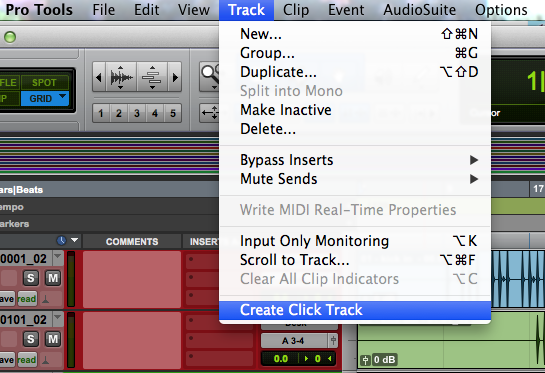
This will work for anything listed in the menu area of Pro Tools.   Even if there is already a keyboard shortcut assigned!    This works in all Mac OS and Pro Tools systems slightly differently.   But the steps are all pretty similar.     For Windows systems I believe the process would be very similar.    See Sound on Sound article here. 

Here in a forty second video, I demonstrate the process.

STEP BY STEP INSTRUCTIONS

                           Before                                                      After

Screen Shot 2015-05-18 at 8.20.16 AMScreen Shot 2015-05-18 at 8.31.33 AM

1.   Identify the menu item needing a custom shortcut.   Make note of the EXACT wording, spelling, capitalization, and spaces.

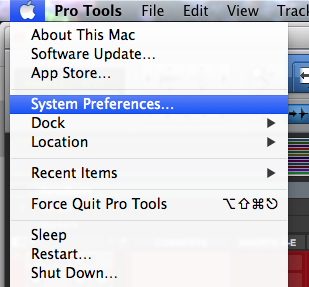
2.  Mac/System Preferences.

Screen Shot 2015-05-18 at 8.21.12 AM

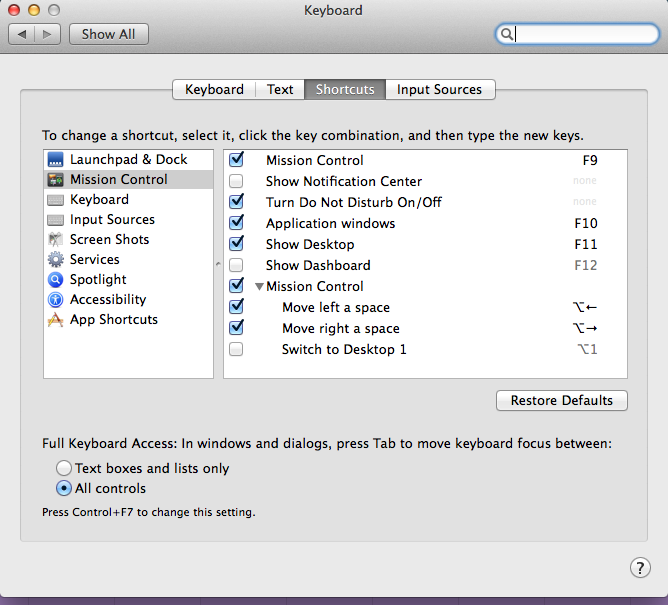
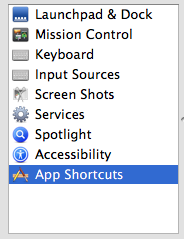
3.  Select KEYBOARD preferences.

Screen Shot 2015-05-18 at 8.21.58 AM

4.  App Shortcuts in the left column.

Screen Shot 2015-05-18 at 8.22.31 AM

5.   Select the  +  button.

Screen Shot 2015-05-18 at 8.22.48 AM

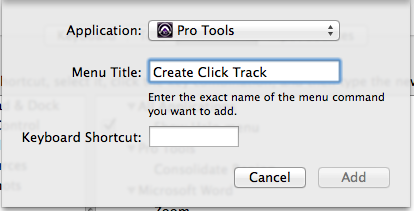
6.  If the Application is not in the drop down menu at the top, go to the bottom of the list to “Other…”  and you can add Pro Tools.

Screen Shot 2015-05-18 at 8.24.26 AM

7.  Type in the exact name of the menu command for the Menu Title.   Choose a new (unused) shortcut.

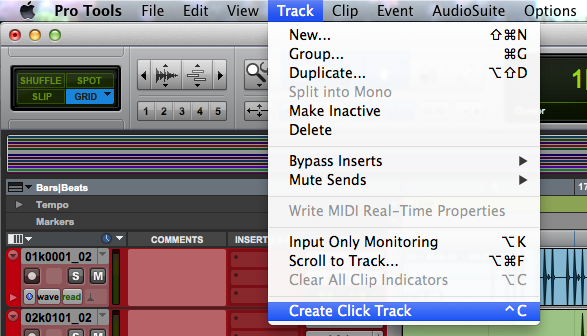
8.  Go to Pro Tools.  Behold, and experience the magic.

Screen Shot 2015-05-18 at 8.31.33 AM

On a similar note, there are companies and individuals that create software for macro commands.   Meaning that you hit one key, and in the software it can do a series of things.  For example, you could hit Option-1 and the software would run a script of actions:  create eight stereo aux tracks, inputs sequential, four different compressors on each, with custom settings, a reverb send, with custom setting, set up a parallel compressor for one of them, create custom track colors and names for them.

One (of many) ways to accomplish this is with Slate Batch Commander.

There are other options that run keyboard scripts.  So if it’s a series of keyboard shortcuts that you can program in, that series can be reduced to a single hotkey!      Keyboard Maestro ($35 US) is one that seems to be highly recommended.

Creative Audio Production – The Videos

Posted by petebuchwald on May 17, 2015
Posted in: Uncategorized. Leave a comment

I just realized that here in the blog I’ve never listed the URL for our video content.

Quick, handy tip for producers!

Posted by petebuchwald on May 13, 2015
Posted in: Uncategorized. Leave a comment

Very cool!  Mac life-hack of the day.

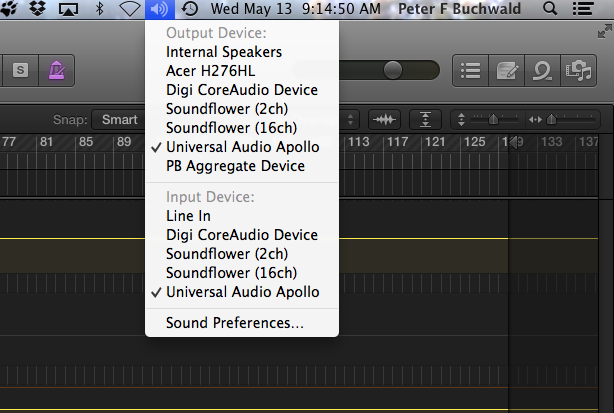
Option-click on the small speaker icon in the menu.   You can change the sound card without opening preferences!!

Screen Shot 2015-05-13 at 9.14.32 AM

EPISODE SEVEN: Found Sound

Posted by petebuchwald on May 4, 2015
Posted in: Uncategorized. Leave a comment

There is a current movement among audio producers, electronic musicians, and the like.    People are finding ways to blend organic audio matter with digital trickery, and the results are often very interesting.     In this episode (and the next) we will look at a few ways that electronic musicians are going organic.

Pretty Lights recently has been booking studio time, bringing in musicians (horn sections, guitar, etc) treating them like a virtual instrument by asking them to play certain phrases.  This while recording them to analog tape, then onto acetate (vinyl), and finally he transfers  the samples into his Ableton environment.   (http://www.seattletimes.com/entertainment/pretty-lights-gets-deep-on-all-original-new-album/).

pretty lightspretty lights in studio AcetateCutter       But this new practice of Found Sounds takes it a step further.    Imagine stepping out into the world, in the city, suburbs, on a goat farm, etc. and recording with your handheld recorder sounds gathered from the physical world.     You can bang on a dumpster, you can crush a discarded Dr. Pepper can, throw a rock into a pond, close the tailgate of an old pickup…. record these and more sound sources and import them into your computer editing/production software and try to make something rhythmic and musical out of it.

Ordinary objects can sometimes sound extraordinary!   For fun, I took some samples of a bike, and created a couple of simple one bar drum patterns.

Here are some kitchen sounds, made in to a beat.

      Diego Stocco, a hero of ours, has been known to record very cool beats using only what he could find at place like a dry cleaners.     More on Diego next time! https://vimeo.com/29273575 So, for EPISODE SEVEN of Creative Audio Production

….Here is an interview with Jake Harrison a Denver artist who is experimenting in this emerging new art form of Found Sound. Follow Jake and his music at: www.jakeharrisonmusic.com www.facebook.com/atthismusic

Want to try using found sounds, but feeling a little to comfy in your chair?     http://www.FreeSound.org is a wonderful online community where you can download recorded sounds for music, video production, etc.       I’ve downloaded a few in the past, and I try to give back to the community by posting odds and ends.

http://www.freesound.org/people/petebuchwald/

I encourage you to give Found Sounds a try!   Go out, record weird and commonplace things, import them into your audio production environment and tweak away!    Let us know what you come up with!

Omnisphere 2 (Coming April 30, 2015)

Posted by petebuchwald on April 28, 2015
Posted in: Uncategorized. Tagged: audio, cost, details, diego, new, omnisphere, omnisphere 2, omnisphere two, review, spectrasonics, stocco, synth, upgrade, vst. Leave a comment

For those of you who have enjoyed Omnisphere, your enjoyment is about to get an upgrade.

Here’s the skinny:

      3,000 new preset patches.    Synthesis functionality expanded significantly;  from 7 oscillators to 10, new drag and drop audio files in for granular synthesis fun, and more.

      New sampled sounds include stalactites in a cave (!!)  circuit bending, old cheap synths, and other interesting acoustic sources.    

      Waveform library expanded from 4 to 400+.     

      Analog drift function makes synths sound huge.

      NEW EDM patch library.

      Arpeggiator functionality increased.   More effects available.   

       Improved browser organization.   Including Sound Match, which locates similar patches, so if you found a sound that is close to what you want, but not quite, it will pull up similar patches for you to try.     Makes finding the needle in the haystack a lot easier.   

       Even Spectrasonics founder Eric seems to have gotten an upgrade, he’s lost some weight or been working out.  Lookin good Eric!

        Also included is some convolution creativity with the Innerspace effect rack.  Tic Tacs on Glass, for example.    If you are familiar with the creative work of Diego Stocco, the sonic results are similar to his.   In fact, Diego seems to be a contributor to the upgrades of Omni 2!  

Screen Shot 2015-04-28 at 8.14.21 AM

COST  – $499 US

UPGRADE COSTS

Standard Upgrade: $249 *
For all Omnisphere 1 customers
(Standard and Transfer Licenses)
VIP Upgrade: $199 *
For customers who own Omnisphere, Trilian and Stylus RMX
(Standard Licenses)
Grace Period Upgrade: FREE
For new Omnisphere customers from October 2014 thru May 2015
(Standard Licenses)

Posts navigation

← Older Entries
Newer Entries →
  • Recent Posts

    • ARP 2600
    • Step Sequencing with Logic Pro !!
    • New Virtual B-3 from Arturia, Review
    • Multi-Instruments in Logic Pro (Omnisphere)
    • No More Wobble in the X-Stand (Keyboards)
    • Analog Synths and a DAW – Creative Connections
    • Music Promotion; it can be a visual thing
    • (Another) Great Freebie !!
    • 64-Bit Sylenth (Mac) Is Here !
    • Amazing Collection of Free Samples
    • Vinyl Simulation Plugin – Free
    • Free Tube Style Compressor ($120 usually)
    • A Singing Synthesizer?
    • Parallel Compression with Professor Lorne
    • Check it Out! An Affordable Analogue Synth
    • Secret Easter Egg in Pro Tools
    • Running Audio Through a Virtual Synth??
    • Where Synth History Meets Monty Python
    • Komplete List of Release Dates
    • Pro Tools: Instantly Create New Tracks
    • DNA Glitch Effect (Zedd, etc)
    • If You Create Music. You Can Make Money!
    • Did you know? Shuffle-Grid Mode …. It’s a thing.
    • Slate Remote (with Batch Commander)
    • Logic Pro X Courses (Free!)
  • Join Our Facebook Page!

    Join Our Facebook Page!
  • Follow Creative-Audio-Production.com on WordPress.com
  • Enter your email address to follow this blog and receive notifications of new posts by email.

    Join 1,867 other subscribers
Blog at WordPress.com.
Creative-Audio-Production.com
Create a free website or blog at WordPress.com.
Privacy & Cookies: This site uses cookies. By continuing to use this website, you agree to their use.
To find out more, including how to control cookies, see here: Cookie Policy
  • Subscribe Subscribed
    • Creative-Audio-Production.com
    • Already have a WordPress.com account? Log in now.
    • Creative-Audio-Production.com
    • Subscribe Subscribed
    • Sign up
    • Log in
    • Report this content
    • View site in Reader
    • Manage subscriptions
    • Collapse this bar
 

Loading Comments...