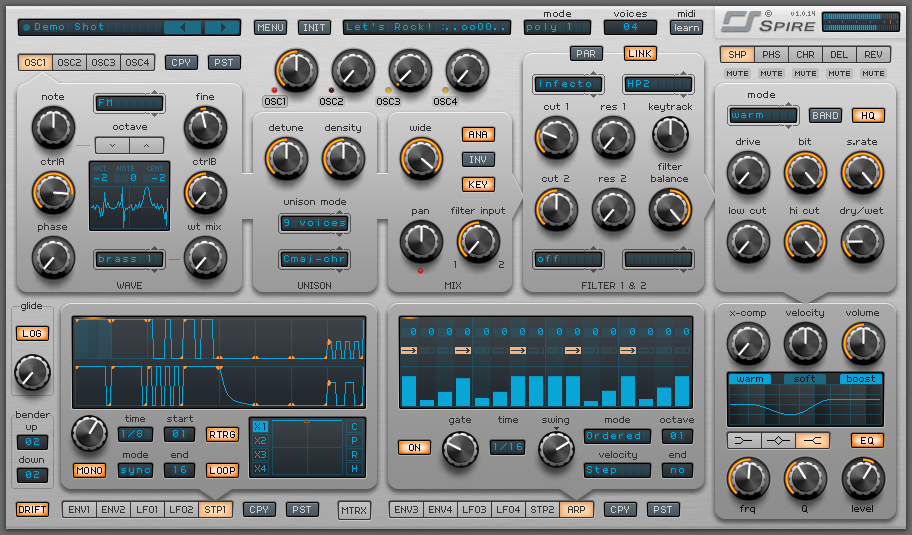
Meet the new kid on the block. Among producers around the world the Spire virtual synth is quickly gaining traction as a serious player.
Free to try, and not too expensive to buy.
If you are a producer, using virtual synths and looking for some fun new sounds I have a great new resource for you. It’s taking the EDM by storm, and you should get on board!
It’s called Spire. From Reveal Sound.
The synth costs about $180 (US). It comes with 128 presets, and you can purchase additional preset packs. If you are a student, or faculty member Reveal Sound offers a 50% discount!
The demo version is fully functional, but occasionally inserts white noise.
A free library of samples that you can use for your production work. Great musicianship, great audio engineering …. give them a shot, and if you like them, see if you can find a tip jar on the website and offer a little bit of “thank you” to the cool folks that offer this.
Many of you have probably found links to Waves.com and other plugin websites offering special deals on their plugins today.
You can often get EVEN BETTER prices on those plugins through http://highprofileaudio.com/plugindiscounts/
For example:
Waves Gold (usually $600) includes 35 plugins on the manufacturer’s website is $199 today. Which is great! But even better is that on http://highprofileaudio.com/plugindiscounts/ it is $146.
If you are reading this, perhaps you are like me. I have been hearing about Landr’s service offering “instant online mastering” and as an audio engineer I was both pessimistic and curious.
So I decided to try it out, and hear for myself what Landr would do to my tracks.
I uploaded four tracks, of various styles, that were not mastered. And listened to the results of Landr.
The user interface is simple, and it’s free to upload any track and get a preview of what the master would sound like. In real-time, as the track plays, you can go back and forth between unmastered and mastered. Very nice feature.
They encourage the uploading of .wav files (uncompressed).
What I heard in the mastered examples for my tracks was exactly what I expected to hear. The stereotype of mastering is a louder track, and with hyped high frequencies, and that’s what I have heard in my masters.
I think this website would not be helpful for any audio engineer who knows what mastering should be. Because if an engineer wants a mastered track that is louder and with boosted high frequencies, they could do those two things (and other things) themselves.
In fairness to Landr their product does deserve a place in today’s audio production landscape. I would suggest it to a home studio enthusiast, creating tracks on a laptop, who is unfamiliar with how to master a track. Also, I recommend it for the artist with low distribution (soundcloud.com, etc.) without the budget to have their track professionally mastered.
I disagree with the website’s claim to be Professional Audio Mastering. They are accurate, in that a professional is one receiving payment for their service. But other than that, I don’t believe their claim. This is not professional mastering. The process is too predictable, cookie-cutter, and inflexible (even with advanced pricing options).
In terms of pricing, they offer very fair pricing options (for). They even offer free master .mp3 files with their Free membership package.
These are the opinions of one audio engineer, and I encourage YOU to try out Landr for yourself, and share your findings here.
I love music with vocal harmonies. So as a songwriter it was great once I had multi-track technology. I could layer vocal harmonies for days. But what I found was that I didn’t always know what melodies would lend themselves to good harmony singing.
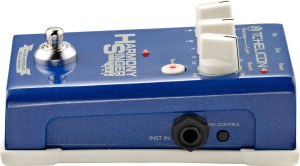
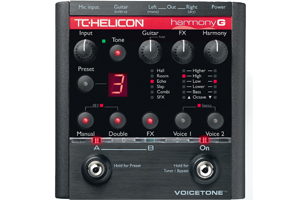
What I needed was something that could generate harmonies in real-time. And along came, the TC Helicon pedal Harmony Singer.
In a nutshell, here’s how it works: You plug in your microphone, then out of the pedal you have second microphone cable taking the sound to your mixing console (or computer interface). Then you connect a guitar, using a standard guitar cable. As you sing and play, the pedal can generate vocal harmonies based on the chords that you play on the guitar! So cool!
With the new Harmony Singer pedal from TC Helicon, I can write songs and have the sound of backing vocalists while the song is still unfinished.
Although it’s designed to be used with a guitar (acoustic or electric) I have tried using it with a digital keyboard. The result was that it worked pretty well. I would say it was about 90% as accurate, compared to the harmony voices generated by an acoustic guitar.
Overall I am very pleased with how this device performs. It usually creates the correct harmonies, though sometimes it helps to alter your guitar chord voicing to help the pedal recognize what parts to sing. One feature I wish this device had; a second foot switch that would allow me to toggle between having one backing singer to two backing singers. Granted, TC Helicon has other pedals, that seems to offer a performer more functionality/complexity.
I am loving my Harmony Singer pedal, when I unpacked it and plugged it in I found myself jamming with it for about two hours. If you are the type to sing in small venues, coffee shops, etc. This is a quick way to add a backing vocalist to some of your songs, if you can’t get a real person to help you out.
Here’s a video of me showing you the pedal in action:
In the news! Creative use of sine waves in medical technology. Can we identify the resonant frequency of a cancer cell and then destroy the cell if we blast it with that frequency??
http://www.thecuredocumentary.com/
“Historical Instances of Audio Production Weirdness”
THE VOCODER
The vocoder was initially developed by our friends at Bell Labs in the 1930’s for enhancing telephone speech, particularly for long-distance calls. This is not the only time Bell Labs has helped provide us audio engineers with technology we use! They were very instrumental in the development of digital audio technology.
The patent for the vocoder was filed by Homer Dudley in 1939 and was introduced to the public shortly after that at the New York World’s Fair. The technology was integrated into the SIGSALY communications computer used by the US in World War II. The SIGSALY was a machine that scrambled the communications between US and British forces, making them impossible to understand without.
Eventually the technology known as the Voice Encoder became abbreviated into the “vocoder” we know and love.
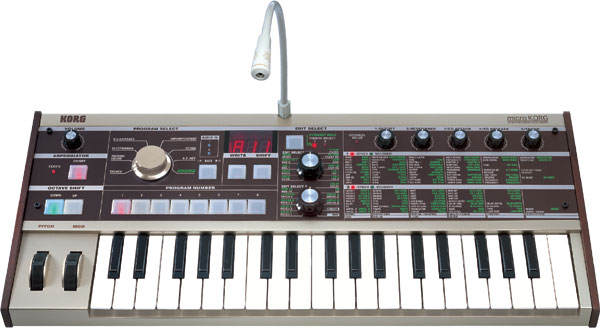
(PHOTO BELOW: A 1970’s Kraftwerks vocoder)
Vocoder’s can currently be found in hardware synthesizers by Akai, Yamaha, Korg, and others.
Virtual vocoders can be found native in Logic Pro, Reason, Cubase, Ableton and other DAWs. Third-party plugin versions of vocoders are created by Waves, Arturia, and Native Instruments
For a tutorial on using the Logic EVOC 20 vocoder here’s a video I made:
Modern day artist Imogen Heap seems to often gets cited as a vocoder user. But I’m not sure it’s a true vocoder. She uses a TC Electronics Voice Live 2, which according to the manufacturer “often contains a vocoder type quality.”
Check out Laura Clapp giving a demo of this technology:
For further research: check out NPR’s short but informative segment on “All Things considered” http://www.npr.org/templates/story/story.php?storyId=126781688
Also check out Dave Tomkin’s excellent book “How to Wreck a Nice Beach: The Vocoder from World War II to Hip-Hop, The Machine Speaks”
Reverse Reverb! “KA-POW”
The creative production technique shared in this episode of the podcast will come in handy for producers of pop, electronic, rock, and other genres.
The end effect is an odd sound that crescendos out of nowhere into the original sound. The “odd sound” contains all the sonic DNA of the target sound, so even though there is an unnatural quality initially, once the target sound is reached there is a sense of retrospective resolution.
Remember; the SPECIFICS of how you engineer this can vary in your situation/DAW. If you keep the following steps in mind and understand them, you can do it a totally different way than the video example I give.
Remember a BUS allows you to record from one track to another in your audio software. If you understand how to use a bus in this way, you should be able to do this effect without a problem.
The steps/recipe to form reverse reverb:
1. Identify the target sound. (“HEY, baby you sure look fine ….”)
2. Isolate the target sound as a short sound file, even a quarter note. (“HEY”)
3. Reverse the target sound. (“YEH”)
4. Put a reverb on the track with the target clip. (“YEH … reverb …. reverb….”)
5 Print that sound WITH reverb as an audio file. This is where you would use a BUS to record from one audio track to another.
6. Reverse that new audio file, voila! (” …. reverb ….. reverb ….. HEY”)





















 Creative-Audio-Production.com